How can I preview my store from another country?
You can preview your storefront using GLC's Preview your store menu or a VPN tool.
Option 1: Preview from GLC
- In GLC, go to Geolocation.
- Click Preview your store in the top-right corner.
- Choose By country and select the country you want to test.
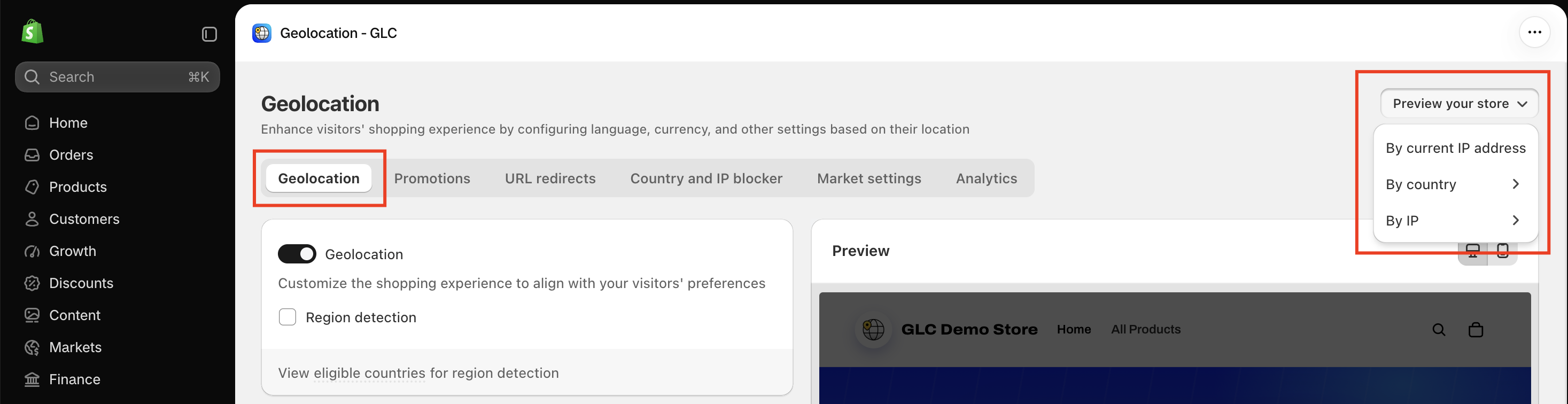
The menu also provides two other options:
- By current IP address: View your storefront using your current IP address.
- By IP: Preview your storefront using a specific IP address.
Option 2: Use a VPN
- Open your VPN tool and connect to a server in the country you want to test.
- Open a new private or incognito window in your browser.
- Visit your storefront and check how GLC responds to that location.
Using a private window helps prevent previously saved country, language, or currency preferences from affecting your test.
Check your settings
The language and currency displayed depend on your GLC and Shopify Markets settings. Testing from another country does not necessarily change both.
Check Ship to, Language, and Currency separately in the GLC Selector.
If your preview doesn't show the language or currency you expect for a country, email us at [email protected] with the country you tested and a screenshot. We'll help you check your settings.