The Shipping Discount promotion type is unavailable
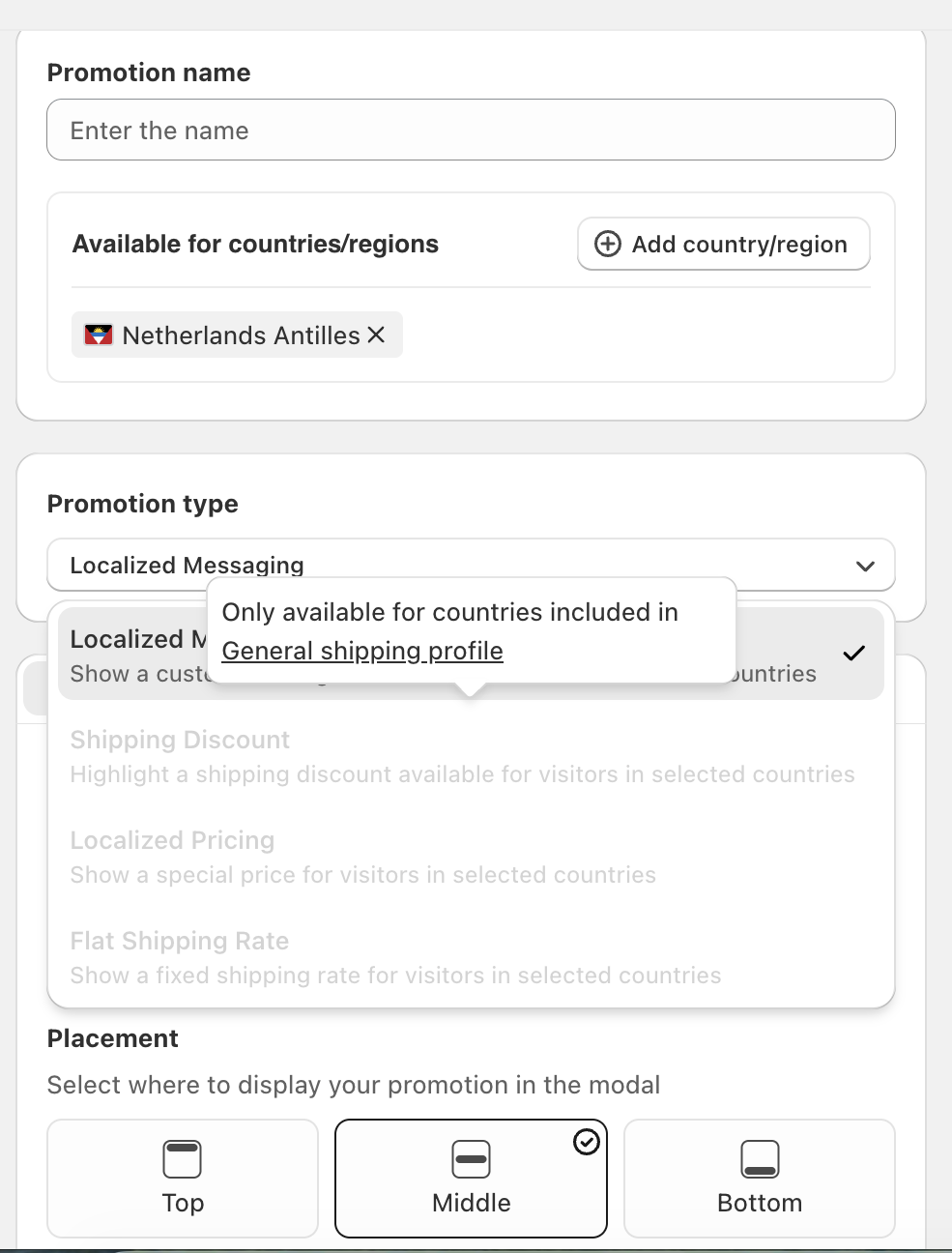
Shipping Discount appears greyed out when you create a Geo Promotion.
1. Check the selected countries
Open Shopify admin → Markets and confirm that the countries selected for the promotion belong to active markets.
2. Check the General shipping profile
Open Shopify admin → Settings → Shipping and delivery. Review the General shipping profile, including its shipping zones and rates for those countries.
The Shipping Discount promotion type requires supported countries in the General shipping profile. Check the tooltip beside the unavailable option for the requirement affecting your selection.
3. Reopen the promotion
Save your Shopify settings, return to GLC → Geolocation → Promotions, and check the selected countries and Promotion type again.
For the remaining setup, follow Create and manage Geo Promotions.
If the option remains unavailable, send the selected countries, tooltip screenshot, and relevant shipping profile settings to [email protected]. We'll take a look for you.